


Navigate Black Diamond with confidence. This Client Experience User Guide walks you step-by-step through the dashboard and key navigation.
Home
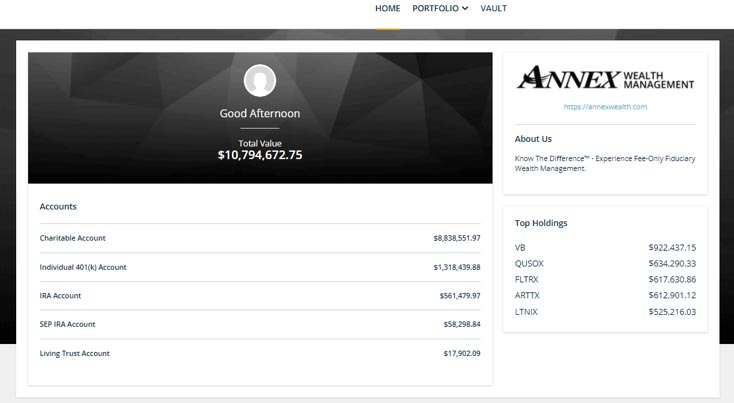
On your home page, see a quick view of your account balances and top holdings.
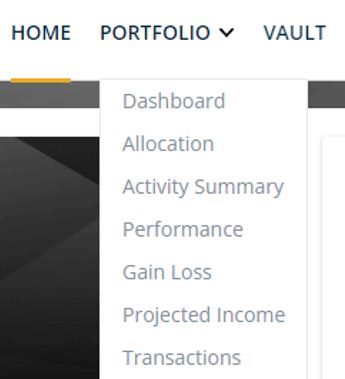
Portfolio View
You can switch your view to see portfolio details by topic, or as a whole picture with the dashboard at the top of the page.

Filters
At the top left-hand side of your Dashboard, you will see the name of your portfolio and a few ways you can update your view.
The Switch button allows you to change your view from full portfolio to specific accounts.
With the Filter button, you can choose which accounts you’d like to include in your Dashboard view. Your cards will all reflect the accounts you choose to view.

Date Range
This is a “sticky date”. When you change the date here, the same date will be applied on all views until it is changed.
Any alerts you may have regarding your accounts will also show here.
Settings will allow you to change your asset views.
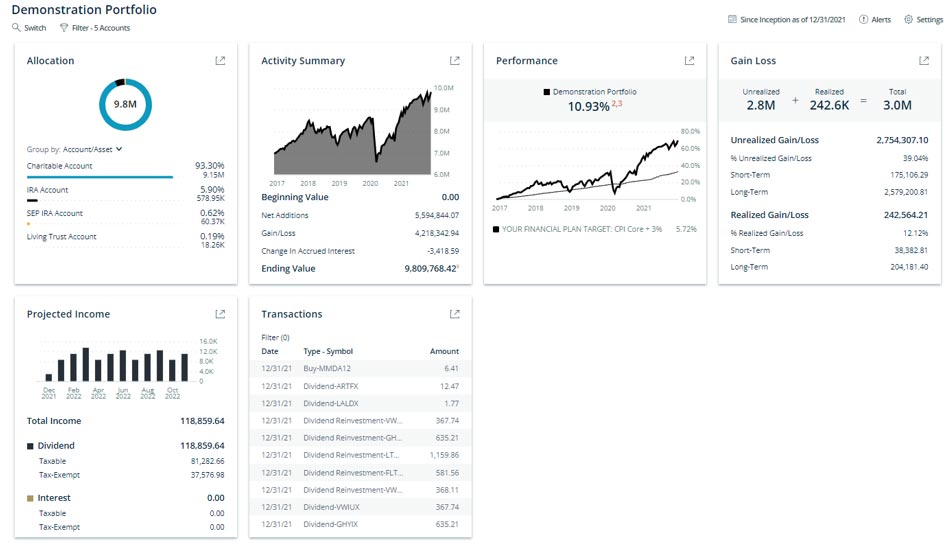
Portfolio Dashboard
Your Dashboard gives you an at-a-glance look at your portfolio, allocation, activity summary and more. Click the arrow in the top right corner of each box to see more detail about that specific topic.
Allocation
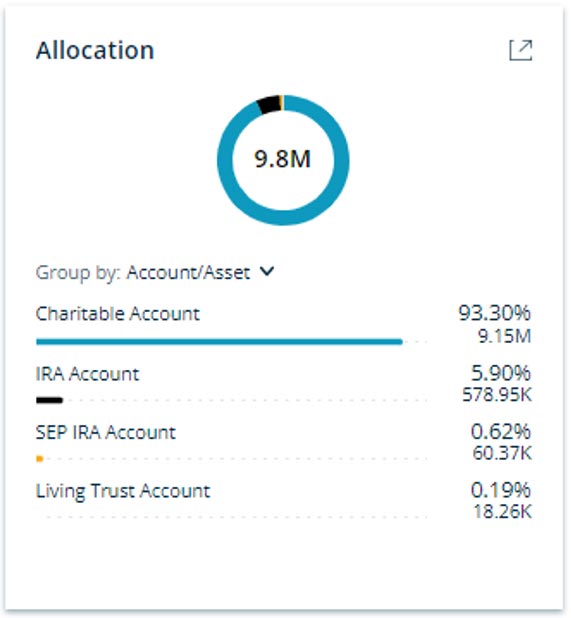
The Allocation card will give you a full picture of your assets as well as allow you to explore the details of your portfolio balances and positions.
By expanding the view, you can see the breakdown of each of your accounts in further detail, including balances and graphs illustrating each account.
If your investment objectives, risk tolerance or overall financial situation have been changed, please notify your Wealth Manager immediately.
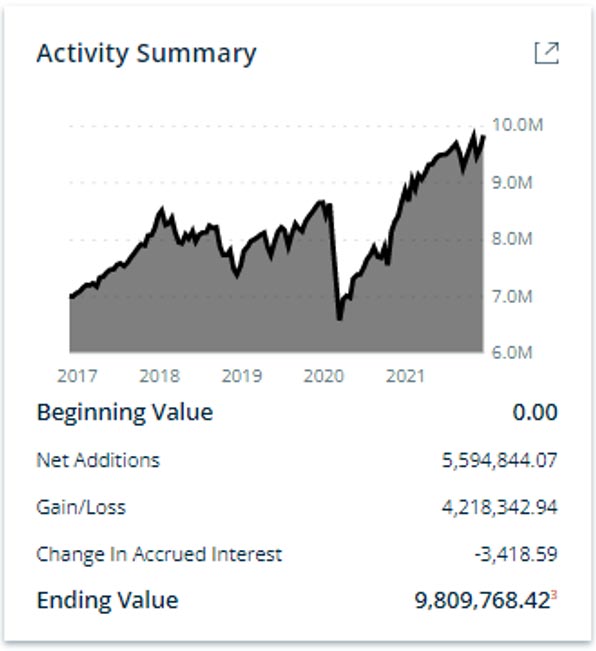
Activity Summary
In the Activity Summary card, you’ll be able to see the movement of your portfolio and how it has moved over time.
By expanding the view, you can look at the details of different accounts held, their individual activity per account, and a view of gain/loss and contributions or withdrawals.
This dashboard does not reflect real time, intraday pricing or activity. Please review your date selection and settings in the upper right corner for additional information. It is important to compare the information on this report with the statements you receive from the custodian(s) for your account(s). Please note that there may be minor variations due to calculation methodologies. If you have any questions, please contact Annex.
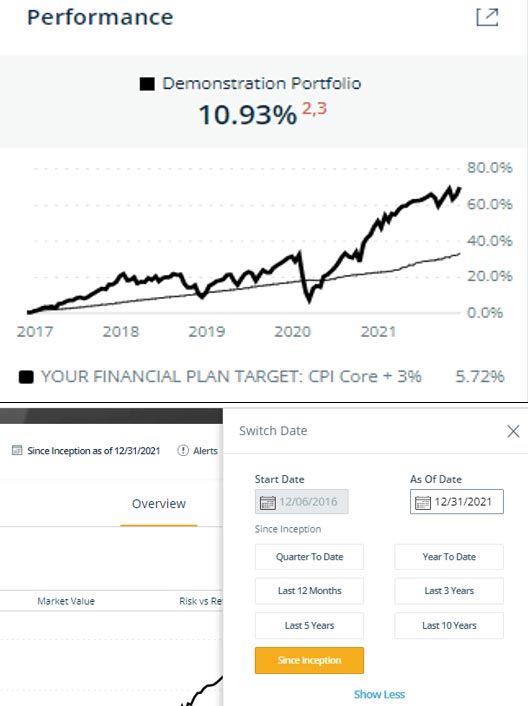
Performance
The Performance card gives you a quick glance at how your portfolio is doing currently.
By expanding the view, you can look at the different accounts held, equities and fixed income per account, and a view of gain/loss and return rates. By clicking on the date in the navigation bar, you can see a quick view of performance based on the dates selected.
Past performance is not necessarily indicative of future results. All investments carry significant risk and all investment decisions of an individual remain the specific responsibility of that individual. There is no guarantee that systems, indicators, or signals will result in profits or that they will not result in a full loss or losses. All investors are advised to fully understand all risks associated with any kind of investing they choose to do.
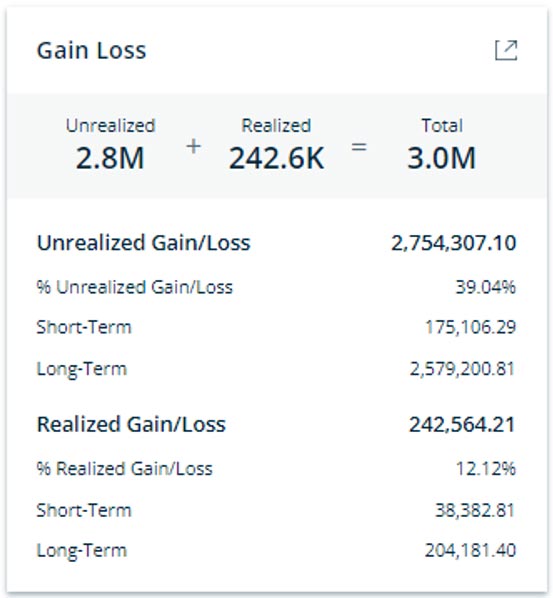
Gain/Loss
The Gain/Loss card allows you to view Unrealized and Realized Gain/Loss cost basis information for your investments.
By expanding the view, you will be able to see how each account and investment type within that account has performed.
This report is provided to you as courtesy. We do not guarantee the accuracy or completeness of said information. All official tax information will be provided by the custodian(s), not Annex. You are strongly urged to review this report against your account statements and transaction confirmations received directly from your custodians for any inaccuracies. You should immediately notify Annex and the applicable custodian(s) of any inaccuracies. This statement has been prepared for informational purposes only and does not replace the statement(s) you receive directly from the custodian(s) of your assets. This report is not intended for tax, lending, legal or other non-financial planning purposes and should not be relied upon by 3rd parties.
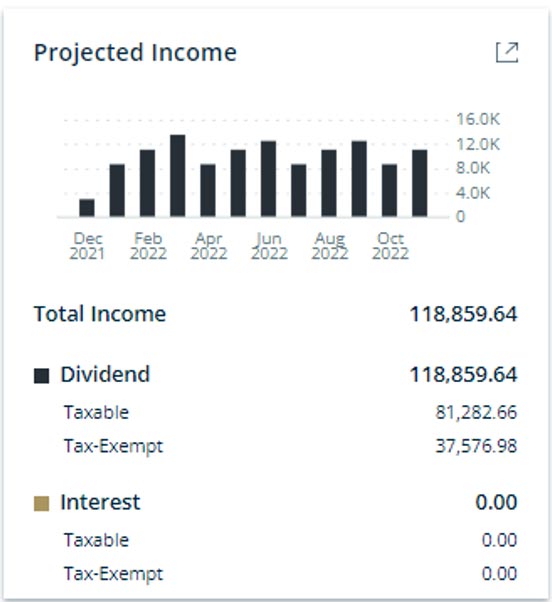
Projected Income
The Projected Income card allows you to view a snapshot of projected dividend and interest payments.
By expanding the view, you will see a month-by-month view of the projections for each class your portfolio is invested in or chose your desired timeframe.
Projected income is subject to change as not all holdings may be held for the entire period. The calculations and assumptions are as follows: Projected Annual Income= Last Dividend Payment 1 × # of Payments/Year × Units Projected Annual Income (Exchange Traded Funds, Mutual Funds)=Annual Dividend Rate (trailing 12 months) × Units Yield=Projected Income / Market Value (equivalent to Annual Dividend Rate / Price) Fixed Income: Projected Annual Income=Coupon Rate × Units × Paydown Factor (if applicable) Yield=Projected Income / Market Value Income is not projected past maturity date (or pre-refunded date for municipal bonds). For securities with irregular first payment periods, the calculation takes the irregular coupon into consideration. Paydown factor is used for mortgage-backed securities when data is provided in custodial files.
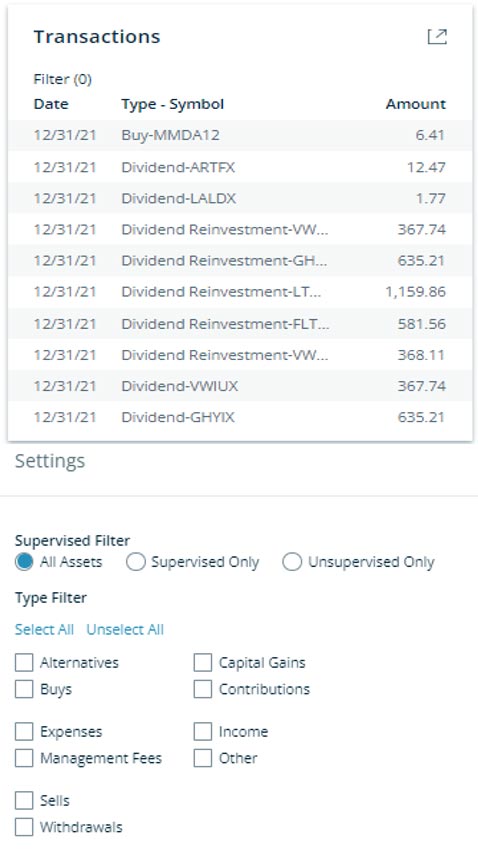
Transactions
The Transactions card allows you to view and filter the most recent transactions in portfolios and accounts.
By expanding the view, you can use the gear icon in the upper right-hand corner to apply the transactions filter to the table.
This dashboard does not reflect real time, intraday pricing or activity. Please review your date selection and settings in the upper right corner for additional information. It is important to compare the information on this report with the statements you receive from the custodian(s) for your account(s). Please note that there may be minor variations due to calculation methodologies. If you have any questions, please contact Annex.

Quarterly Performance Reports
To view your Quarterly Performance Reports once uploaded to Black Diamond, click on the Vault section from the Home page. From there, all reports will be listed.
If you have questions regarding your account or login information, please contact your Client Service Manager.
If you have questions or concerns about your portfolio or investments, please contact your Wealth Manager.